
OCuLink vs Thunderbolt 5: Which Interface Is Better for eGPU and Handheld Gaming PCs in 2026?
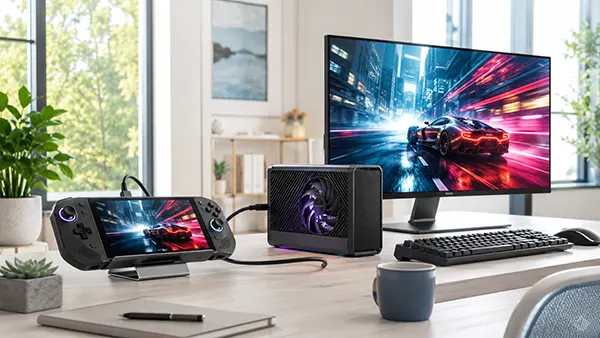
External graphics have become far more relevant to handheld gaming PCs in 2026. A compact Windows gaming device can work as a portable system away from home and connect to a much faster desktop or mobile GPU at a desk. The connection between the handheld and external graphics unit is therefore important: even an expensive GPU cannot perform at its best if data cannot move between it and the processor quickly enough. OCuLink and Thunderbolt 5 are two of the strongest options currently available, but they approach the problem differently. OCuLink concentrates on a direct PCI Express connection and usually delivers better graphics performance, while Thunderbolt 5 combines external graphics, displays, storage, peripherals and charging through a familiar USB-C connector. The better choice in 2026 therefore depends not only on theoretical bandwidth, but also on the graphics card, handheld PC, monitor arrangement and how frequently the computer moves between portable and desktop use.
How OCuLink and Thunderbolt 5 Handle External Graphics
OCuLink is attractive for an eGPU because it essentially extends PCI Express outside the computer. On current handhelds and compact PCs it is commonly implemented as PCIe 4.0 x4, with manufacturers quoting approximately 63–64 Gbps of link bandwidth. GPD, for example, specifies a 63 Gbps direct PCIe Gen 4 x4 OCuLink connection on the WIN 4 2025 and WIN Max 2 2025. The OneXPlayer X1 Pro also includes a PCIe 4.0 x4 OCuLink port. Instead of converting graphics traffic into a general-purpose external connection first, the interface gives the GPU a comparatively direct route to the processor. This does not make an external graphics card equivalent to installing the same card into a full desktop PCIe x16 slot, but it reduces one of the main sources of overhead found in more versatile external connections.
Thunderbolt 5 takes a broader approach. Intel specifies 80 Gbps of bidirectional connection bandwidth, twice the headline bandwidth of Thunderbolt 4, together with PCIe Gen 4 support. More importantly for an eGPU, certified Thunderbolt 5 PCs must provide 64 Gbps of PCIe data tunnelling, compared with 32 Gbps under Thunderbolt 4 requirements. This is the figure that matters most when considering external graphics. Thunderbolt 5 can therefore provide substantially more room for an eGPU than previous Thunderbolt generations, which is why modern products such as the ASUS ROG XG Mobile 2025, ROG XG Station 3 and Razer Core X V2 can use the connection for significantly faster external graphics configurations.
The frequently advertised 120 Gbps Thunderbolt 5 figure needs some context. Thunderbolt 5 normally operates with 80 Gbps in each direction. Its Bandwidth Boost mode can rearrange the connection to provide as much as 120 Gbps in one direction while retaining 40 Gbps in the other, primarily when unusually high display bandwidth is required. It does not mean that a graphics card receives a simple 120 Gbps PCIe connection. For eGPU comparisons, treating Thunderbolt 5 as a 120 Gbps graphics interface can therefore create the wrong impression. Its certified PCIe tunnelling capability is 64 Gbps, putting its theoretical PCIe bandwidth in roughly the same class as the common PCIe 4.0 x4 implementation of OCuLink, although the two connections do not deliver identical real-world results.
Why Similar Bandwidth Numbers Produce Different Gaming Results
The important difference is what happens between the processor and the external graphics card. OCuLink carries PCIe traffic comparatively directly. Thunderbolt 5 has to carry PCIe alongside the other capabilities built into Thunderbolt and uses controllers at both ends of the connection. This makes Thunderbolt dramatically more versatile, but there is some protocol and controller overhead. Consequently, two connections with similar theoretical PCIe bandwidth do not necessarily move the same amount of useful graphics data in practice. Latency can also matter because games constantly exchange smaller pieces of information between the processor, system memory and GPU rather than simply transferring one large file from one device to another.
A widely reported GeForce RTX 5070 Ti comparison illustrates the difference. In that test, OCuLink achieved approximately 6.6 GB/s from the host to the device and 6.7 GB/s in the other direction, while the tested Thunderbolt 5 connection reached roughly 5.6 GB/s and 5.8 GB/s. Across twelve tested games, the Thunderbolt 5 configuration produced average frame rates around 13–14% below OCuLink. Individual results varied considerably, with some titles showing relatively small differences and bandwidth-sensitive games showing gaps above 20%. These figures should not be treated as a fixed percentage for every computer or GPU. Processor performance, the Thunderbolt controller, eGPU enclosure, graphics driver, game engine, resolution and display connection can all alter the result.
How the display is connected matters as well. If an external monitor is attached directly to the HDMI or DisplayPort output of the eGPU, rendered frames can travel straight from the graphics card to the display. If the player uses the handheld’s internal screen, completed frames generally have to return from the external graphics card to the handheld over the same external connection. That additional traffic can increase the performance penalty. For a permanent desk arrangement, connecting the monitor directly to the external graphics card is therefore usually the better configuration. The interface difference can also become more noticeable when using a powerful GPU for very high frame-rate gaming, because the connection has to support more communication between the processor and graphics card.
Which Connection Works Better with a Handheld Gaming PC?
The handheld market makes the comparison more complicated because the available port determines much of the decision before an eGPU is purchased. OCuLink remains a specialist connection rather than a standard feature across every major handheld. Current examples include the GPD WIN 4 2025 and WIN Max 2 2025, which combine 63 Gbps OCuLink with a separate USB4 port, and the OneXPlayer X1 Pro, which provides both OCuLink PCIe 4.0 x4 and two USB4 connections. This combination is particularly useful because the dedicated connection can be reserved for graphics while USB-C handles charging and other accessories. A handheld without a native OCuLink connection normally cannot gain one simply by using a passive USB-C adapter because the two interfaces carry PCIe in fundamentally different ways.
Thunderbolt 5 is easier to integrate into a conventional docking arrangement, although native Thunderbolt 5 is still not present on every handheld gaming PC in 2026. Many portable gaming systems continue to provide USB4 instead. Some current Thunderbolt 5 eGPU products are designed to retain compatibility with slower connections: ASUS states that the ROG XG Mobile 2025 can also operate with suitable Thunderbolt 4 and USB4 computers, while Razer lists Thunderbolt 4, Thunderbolt 5 and compatible USB4 systems for the Core X V2. Connecting a Thunderbolt 5 eGPU to a USB4 or Thunderbolt 4 host, however, does not upgrade the computer to Thunderbolt 5 bandwidth. The external graphics unit must operate within the capabilities of the connection provided by the host.
This distinction is important when shopping specifically for a handheld. Buying an expensive Thunderbolt 5 enclosure for a gaming PC that only provides a 40 Gbps USB4 connection may still improve graphics performance considerably, but the eGPU cannot use the full PCIe capability available from a native Thunderbolt 5 computer. Conversely, buying an OCuLink dock is sensible only if the handheld exposes suitable PCIe lanes through an OCuLink port or an officially supported equivalent connection. The connector specification should therefore be checked before choosing the external GPU rather than after it. A USB-C socket alone does not confirm Thunderbolt 5, Thunderbolt 4, USB4 or eGPU support, even though these connections can share the same physical connector shape.
Portability, Charging and Everyday Docking
Thunderbolt 5 has a clear advantage when a handheld or compact computer regularly moves between a desk and portable use. The same USB-C connection can carry PCIe data for external graphics while also supporting monitors, storage, Ethernet, keyboards and other USB devices through a suitable dock. Thunderbolt 5 also supports USB Power Delivery. Intel’s specification allows charging of up to 240 W where the host, cable and accessory support it, although individual eGPU products can provide less. The ROG XG Mobile 2025, for example, specifies Power Delivery of up to 140 W on its computer connection. A well-designed Thunderbolt 5 eGPU can consequently replace several separate cables when the computer returns to a desk.
OCuLink is much more focused. The connection itself does not normally provide charging, general USB connectivity or the peripheral functions expected from a USB-C dock. GPD states, for example, that the OCuLink connection on its G1 graphics unit provides the direct PCIe path for graphics but does not carry the USB-A and card-reader data channels or charge the host. Those functions become available through its separate USB4 connection. A handheld used with an OCuLink eGPU may therefore need one cable for graphics and another USB-C cable for power or docking. That arrangement is not particularly troublesome on a permanent gaming desk, but it is less elegant for someone who connects and disconnects the computer several times each day.
Connection procedure is another practical difference. Thunderbolt was designed around regular attachment and removal of external equipment and its certification programme covers the computer, accessories and cables. OCuLink implementations may require more care. Minisforum, for instance, explicitly states that the OCuLink interface on its UH125 Pro does not support hot swapping and instructs users to turn off the system before disconnecting the cable. Requirements vary between devices, so the instructions for the particular handheld and eGPU should always take priority. For a system that remains connected to an eGPU throughout most desktop sessions, this limitation may matter very little. For a handheld that is repeatedly removed from a dock during the day, Thunderbolt 5 offers a more convenient routine.
OCuLink or Thunderbolt 5: Which Makes More Sense in 2026?
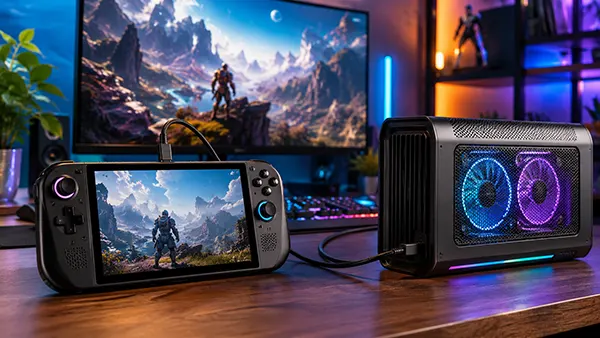
For maximum external graphics performance, OCuLink remains the stronger choice in 2026 when the computer already has a native port. Its PCIe 4.0 x4 connection provides enough bandwidth for serious desktop-class GPUs while avoiding part of the overhead associated with Thunderbolt tunnelling. This is most relevant when the eGPU is the main reason for buying the dock and when a powerful graphics card will spend most of its time connected to an external monitor. A handheld such as the GPD WIN 4 2025 or OneXPlayer X1 Pro can therefore make a convincing small desktop replacement at home while retaining integrated graphics for portable gaming. The user still accepts some performance loss compared with putting the same desktop card directly into a desktop motherboard, but OCuLink generally keeps that loss lower.
Thunderbolt 5 makes more sense when the connection has to perform several jobs at once. It provides much more PCIe bandwidth than Thunderbolt 4 while preserving the familiar USB-C format, display support, peripherals, networking and charging possibilities that make Thunderbolt useful for docking. The growing selection of Thunderbolt 5 graphics hardware also makes it a more practical option than it was when the specification first appeared. ASUS now offers the compact ROG XG Mobile 2025 and lists its full-size ROG XG Station 3 Thunderbolt 5 enclosure, while Razer’s Core X V2 provides another route for using desktop graphics cards with compatible computers. That broader selection reduces one of the earlier problems with Thunderbolt 5 eGPUs: having a fast host connection but very few appropriate graphics enclosures.
The graphics card itself should also influence the decision. Spending heavily on a very fast desktop GPU and then placing it behind a restricted external connection can produce poor value, particularly in high-frame-rate games where communication with the processor is frequent. OCuLink gives such a card more opportunity to approach its normal performance. With a less demanding GPU, the convenience of Thunderbolt 5 may be more important than chasing the final percentage of frame rate. Resolution changes the balance too. At high resolutions and demanding visual settings, the GPU often becomes the main limiting component, while lower resolutions and high refresh rates can expose processor and connection limits more clearly. There is therefore no useful rule stating that every eGPU loses the same percentage of performance.
A Practical Choice for Different Gaming Setups
A performance-focused user who already owns a handheld with native OCuLink should normally use that connection for the eGPU. This is especially sensible with a desktop graphics card, a separate power supply and an external monitor connected directly to the card. The resulting desk may have more cables and the computer may need to be shut down before disconnecting the graphics link, but those are reasonable compromises when frame rate is the priority. OCuLink also makes sense for a handheld that spends most of its time as a portable computer but becomes a fixed gaming system for long sessions at home, where the eGPU does not need to be connected and removed constantly.
A user who values quick docking, fewer cables and broader peripheral support should favour Thunderbolt 5, provided the handheld or compact PC actually supports it. The difference from Thunderbolt 4 is substantial enough to make modern Thunderbolt eGPUs much more credible for high-performance gaming, even though current testing shows that the connection can still trail OCuLink. Thunderbolt 5 becomes particularly attractive when the same cable is expected to connect the external graphics unit, displays, network and accessories while supplying power to the computer. It is also the more flexible choice for an eGPU that may be shared between several compatible computers rather than permanently paired with one OCuLink-equipped handheld.
In 2026, neither interface makes the other obsolete. OCuLink is the better specialist connection for extracting as much gaming performance as practical from an external graphics card, while Thunderbolt 5 is the stronger all-purpose connection for a portable computer that frequently becomes a complete desktop setup. Buyers should therefore start with the ports on the actual handheld, confirm the bandwidth and eGPU support stated by its manufacturer, and then consider how the computer will be used at home. For a fixed eGPU gaming desk, OCuLink has the performance advantage. For a one-cable docking arrangement that also has to handle power and peripherals, Thunderbolt 5 is usually the more convenient solution.
Popular articles
-
 Star Wars Zero Company: How XCOM-Style Tac...
Star Wars Zero Company takes a very …
-
OCuLink vs Thunderbolt 5: Which Interface ...
External graphics have become far more relevant …
-
 PRAGMATA: How Shooting and Hacking Reshape...
Released on 17 April 2026, PRAGMATA places …